Aprox can restart a node, shut it down, and wake it again with a Wake-on-LAN packet. Before anything goes down, Aprox tells you which running guests go down with it, and a shutdown needs you to type the node's name, so a slip of the finger cannot power off a server. Node power actions are free on every platform.
Where to find it
The same three actions are available in four places. They behave the same everywhere.
| Place | How to get there |
|---|---|
| Node summary | Sidebar › pve1 › Summary › Actions card: Restart, Shut Down, Wake |
| Node maintenance | Sidebar › pve1 › Maintenance › Power section |
| Context menu | Long-press the node in the sidebar (right-click on a Mac): Restart Node, Shut Down Node, Wake Node |
| Menu bar (Mac, iPad with keyboard) | Node menu: Restart Node ⌃⇧⌘R, Shut Down Node ⌃⇧⌘D, Wake Node ⌃⇧⌘W |
Menu items and buttons are enabled only when they apply: Restart and Shut Down need an online node, Wake needs an offline one.
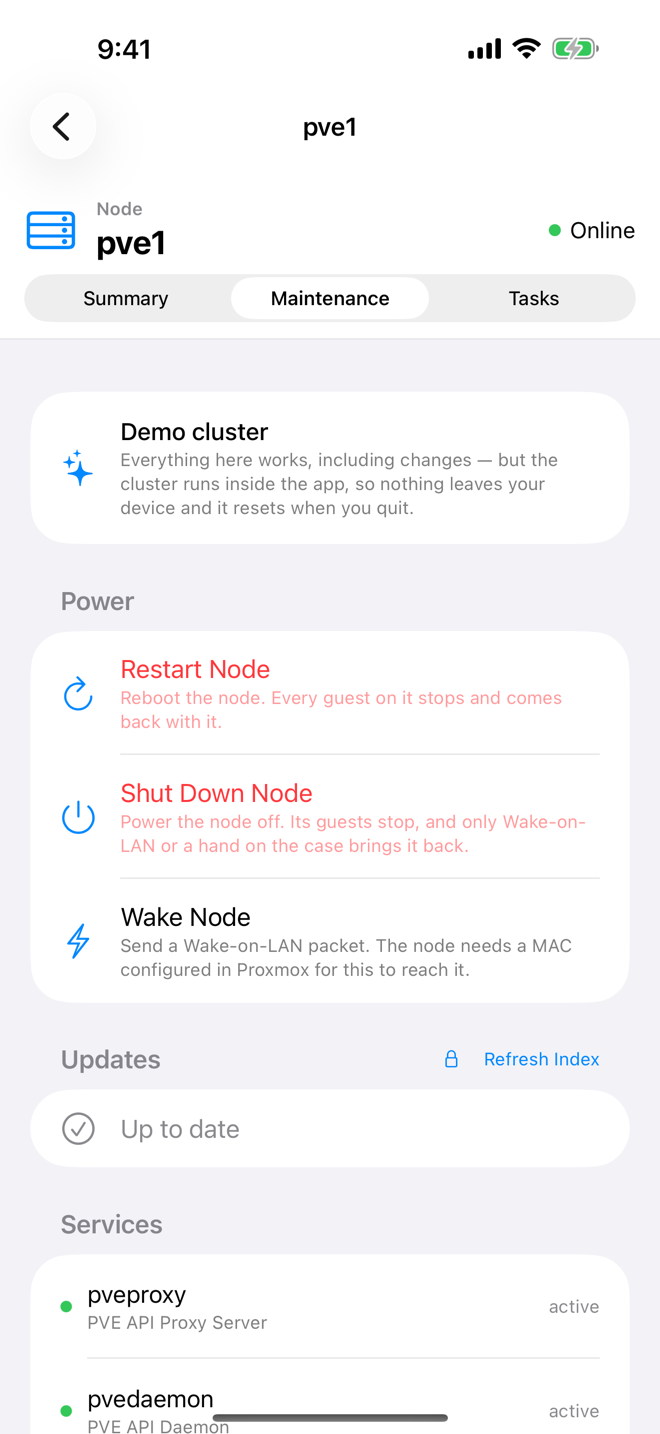
Restart a node
- Tap Restart (in menus: Restart Node).
- A dialog Restart pve1? tells you what goes down with the node:
- Nothing is running on this node right now.
- The guest running on this node goes down with it and comes back when it does.
- or, for several guests, for example "3 guests running on this node go down with it and come back when it does."
- Tap Restart to confirm, or Cancel.
The node reboots. Guests that Proxmox is set to start at boot come back with it.
Shut down a node
A shutdown leaves the node off until someone powers it on, so Aprox asks for more than a tap.
- Tap Shut Down (in menus: Shut Down Node).
- The Shut Down Node sheet opens. Read the warning: "pve2 powers off and stays off. Only Wake-on-LAN or someone at the machine brings it back."
- If Aprox reaches your cluster through this very node, the sheet adds: Aprox reaches this cluster through this node, so the connection drops as it goes down. You lose the connection to the whole cluster until you sign in through another node or the node is back.
- Under These stop too, review the running guests that will stop.
- Under Confirm, type the node's name into Node name ("Type pve2 to enable the button.").
- Tap Shut Down.
Warning
A node that is shut down stays off. Make sure you can bring it back, either with Wake-on-LAN (see below) or by someone at the machine, before you confirm.
Wake a node
- Open the offline node, or long-press it in the sidebar.
- Tap Wake (in menus: Wake Node). It is enabled only while the node is offline.
- Aprox sends the Wake-on-LAN packet at once, without a confirmation. Another node of the cluster that is online sends it on your behalf.
- Wait for the node to boot. Its status in the sidebar turns back to online when Proxmox hears from it again.
Help text in the app: "Send a Wake-on-LAN packet. The node needs a MAC configured in Proxmox for this to reach it."
Requirements on the server
- Privilege: restarting, shutting down and waking a node typically needs
Sys.PowerMgmton the node. - Wake-on-LAN:
- The node's network card MAC address must be configured for Wake-on-LAN in Proxmox VE. In the Proxmox web UI this is under the node › System › Options › MAC address for Wake on LAN, or on the command line, for example
pvenode config set --wakeonlan aa:bb:cc:dd:ee:ff. - The node's firmware and network card must have Wake-on-LAN enabled.
- At least one other node of the cluster must be online and in the same network segment, because it sends the packet. A single-node setup cannot wake itself.
- The node's network card MAC address must be configured for Wake-on-LAN in Proxmox VE. In the Proxmox web UI this is under the node › System › Options › MAC address for Wake on LAN, or on the command line, for example
Good to know
- Alerts stay quiet. If you have alerts turned on, a node you shut down from Aprox does not raise a "node offline" alert for 15 minutes. See Alerts and notifications.
- Watch. On Apple Watch and Wear OS you can restart, shut down and wake nodes too. Restart and shut down ask for a plain confirmation there, since there is no typing on the watch. See Watch app.
- No Siri action. Siri and Shortcuts do not offer node power actions.
- Demo. In the demo cluster, shutting down and waking
pve1orpve2really works inside the app, so it is a safe place to try it.