Backup Jobs shows the scheduled backup jobs of a Proxmox VE cluster and every recent backup run. For each job you see when it runs next, which guests and disks it actually includes, where the backups go and how long they are kept. This answers the question that matters before something breaks: is every guest really being backed up? The view is free and read-only.
Where to find it
Sidebar › server › Backup Jobs.
See the scheduled jobs
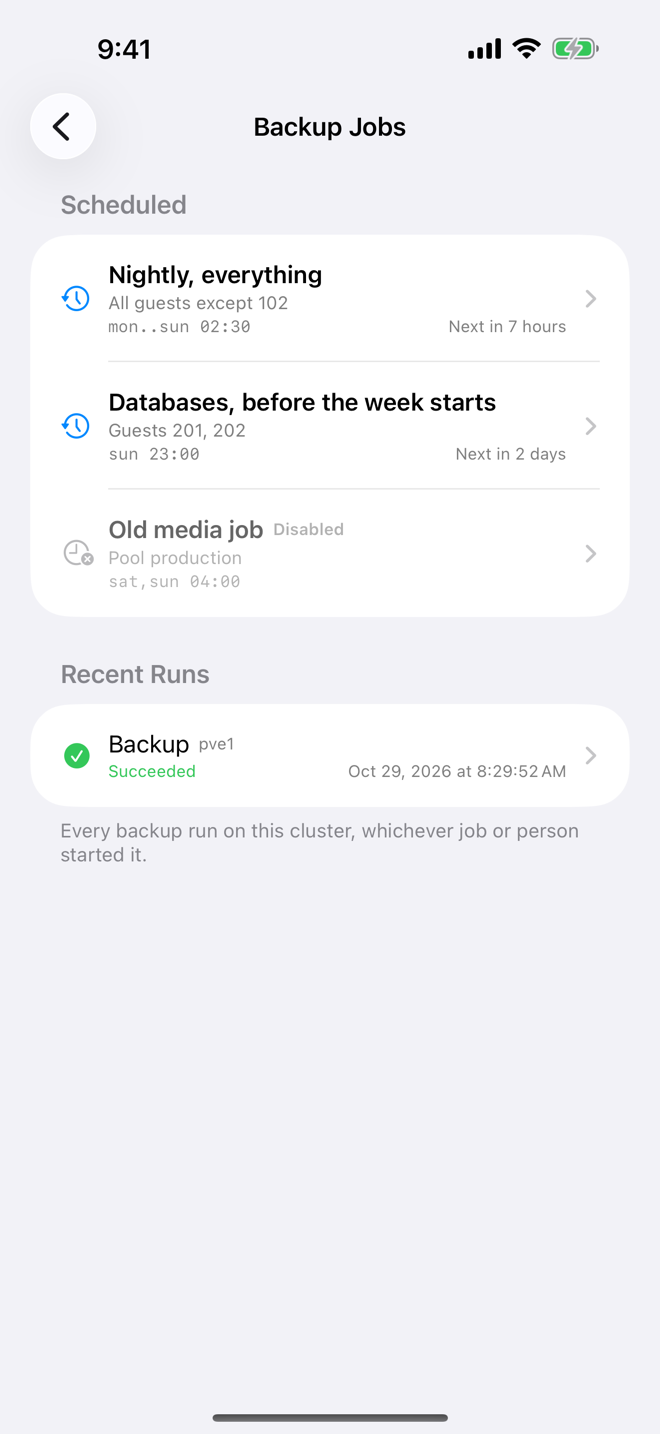
The Scheduled section lists every backup job of the cluster. Each row shows:
- the job's name or comment;
- what it covers, for example "All guests" or "Pool production";
- the schedule, for example
daily 02:00orsat 03:00; - when it runs next, for example "Next in 5 hours";
- Disabled for a job that is switched off. Disabled jobs are dimmed and show no next run.
If the cluster has no backup jobs, the screen says "No backup jobs" / "This cluster has no scheduled backups."
See recent runs
The Recent Runs section lists "Every backup run on this cluster, whichever job or person started it." That includes scheduled runs and backups started by hand, in Aprox or elsewhere.
Each run shows the guest, the node, the start time and the result:
- Running (blue);
- Succeeded (green);
- the error Proxmox reported (red), when the run failed.
Tap a run to open its task and read the full log. See Tasks and logs.
Check what a job covers
- Tap a job under Scheduled.
- Read the three cards:
Schedule
| Field | Meaning |
|---|---|
| Runs | The schedule |
| Next run | Date and time of the next run (enabled jobs only) |
| Status | Disabled, if the job is switched off |
| Storage | Where the backups are written, for example nas-backup |
| Mode | snapshot, suspend or stop |
| Compression | For example zstd |
| Node | The node the job is limited to, or All nodes |
| Notes | The notes template for the backups, if set |
Covers
- Selection says how the job picks guests: "All guests", "All guests except …", "Pool …", "Guests …" or "Nothing selected".
- Below it, Aprox lists every guest the job would back up, with each of its disks:
- a green check for disks that are included;
- a gray minus for disks that are not, with the reason Proxmox gives, for example that backup is turned off for that disk.
- If the selection matches no guest, Aprox warns: "This job would not back up anything tonight."
Retention
- Keeps shows the job's own retention, for example how many daily, weekly and monthly backups it keeps.
- If the job sets no retention, Aprox says "This job keeps whatever the storage is configured to keep."
Tip
Open each job after you add a guest or a disk. The Covers card shows at once whether the new guest is included and whether any of its disks are excluded from backup.
Requirements on the server
Reading backup jobs and runs needs read access to the cluster, typically Sys.Audit, VM.Audit and Datastore.Audit, for example through the PVEAuditor role on /.
Good to know
- You cannot create, edit or delete backup jobs in Aprox. This is by design; use the Proxmox web interface. Aprox shows them so you can check them.
- To back up a single guest right now, use Back up now (Aprox Pro).
- Aprox does not alert you when a scheduled backup did not run. A backup that fails is reported through the "A task fails" alert. See Alerts and notifications.
- Prune, verify and sync jobs of a Proxmox Backup Server can be managed in Aprox. See Prune, verify and sync jobs.