Aprox manages Proxmox Backup Server as well as Proxmox VE. You add a Backup Server like any other server, and it gets its own section in the sidebar: an Overview, one row per datastore, its tasks, remotes, access control and system. Sign-in, certificate pinning and alerts work the same way as for Proxmox VE. Looking at everything is free; actions that change something need Aprox Pro.
Where to find it
- Add the Backup Server, if you have not done so yet. See Add a Proxmox Backup Server. You can also try everything with the sample server Backup Vault (Demo) from the demo.
- In the sidebar, tap the Backup Server to expand it and sign in.
- Tap Overview.
The All Clusters dashboard also lists each Backup Server, as "Backup Server · N datastores".
The Backup Server in the sidebar
Expanded, a Backup Server shows these rows:
| Row | What it opens |
|---|---|
| Overview | The server's front page (below). |
| Datastores | One row per datastore. Each opens the datastore's page. See Datastores and garbage collection. |
| Tasks | Every task on the server. See Backup Server system and tasks. |
| Remotes | Connections to other Backup Servers. See Remotes. |
| Access Control | Users, API tokens, permissions, roles and realms. See Users, API tokens and permissions. |
| System | Server information, updates, services, disks, network, subscription, certificate and power. See Backup Server system and tasks. |
A datastore row carries a red warning sign (Needs attention) when the datastore could not be read, when its last garbage collection or verification failed, or when it is 90% full or more.
Read the Overview
The Overview answers "are my backups healthy?" in one screen. It has these cards:
| Card | What it shows |
|---|---|
| Datastores | Every datastore, worst first, with a usage bar and one line about its state: the last garbage collection (for example GC running, GC failed … or GC 2 days ago), a failed verification, and when it is expected to be full, or else how much space is free. Tap a datastore to open it. |
| Server | CPU, Memory, Root Disk, Uptime and Load, plus the Node name and the Backup Server Version. |
| Failed Today | Tasks that failed in the last 24 hours. Shown only when there are any. Tap one to open it in the server's task list. |
| History | Charts for the server: CPU, memory, network, load average and Root Disk. Choose the Timeframe: Hour, Day, Week, Month or Year. |
If the account you signed in with cannot see any datastore, the card reads "No datastores visible to this user."
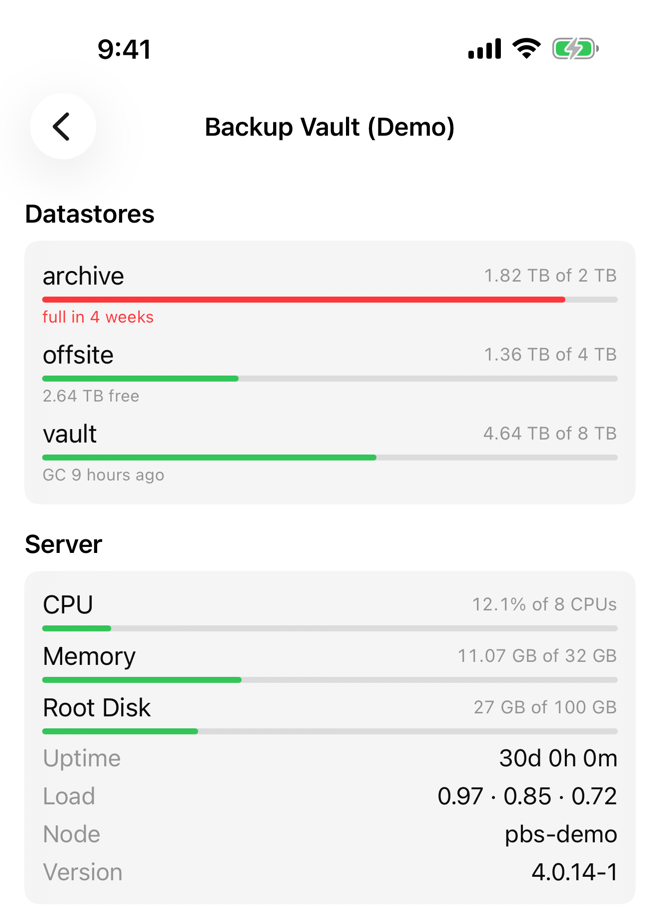
Pull down to refresh (iPhone, iPad, Android), or press ⌘R on the Mac.
What you can do
| Task | Article | Aprox Pro |
|---|---|---|
| Check datastore usage, deduplication and estimated full date; start garbage collection; verify a whole datastore | Datastores and garbage collection | Garbage collection and Verify All |
| Browse namespaces, backup groups and snapshots; verify, prune, protect, annotate and remove backups | Browse, verify and prune backups | Every change |
| Create, edit, run and delete prune, verify and sync jobs | Prune, verify and sync jobs | Every change |
| Add, edit and delete remotes | Remotes | Every change |
| Manage users, API tokens and permissions | Users, API tokens and permissions | Every change |
| Refresh the package index, restart services, restart or shut down the server; follow tasks | Backup Server system and tasks | Updates, services, power, stopping a task |
Requirements on the server
Aprox uses the Backup Server's own API on port 8007. Nothing needs to be installed on the server. What you can see and do depends on the privileges of the account or API token you sign in with. These are the standard Proxmox Backup Server privileges, for example:
| To … | Typical privileges |
|---|---|
| Browse datastores and backups | Datastore.Audit, Datastore.Backup |
| Prune backups and run garbage collection | Datastore.Modify, Datastore.Prune |
| Verify backups | Datastore.Verify |
| Use the System screen | Sys.Audit, Sys.Modify, Sys.PowerManagement |
| Manage users, tokens and permissions | Permissions.Modify |
When a privilege is missing, Aprox explains in plain language what was refused, and the rest of the screen keeps working.
Tip
If you sign in with an API token, remember that a new Backup Server token has no permissions of its own. Give it permissions under Access Control first. See Create an API token.
Good to know
- There is no console for a Backup Server.
- With Aprox Pro, alerts tell you when a Backup Server cannot be reached, a task fails, or a datastore passes 90% full.
- The watch app shows Backup Server datastores with their usage and estimated full date, and can start garbage collection or verify a datastore.